
Sandbox 2.0 - An Augmented Reality Practical Example
After Virtual Reality Comes Augmented Reality
After the big hype around Oculus Quest and HTC Vive Pro, the technology finally seems to have arrived. Anyone who has already fumbled around with a VR headset through a room knows the problem: only you can interact with the virtual world. Furthermore, changes within this world are not perceptible to outsiders. If you want to collaborate with other people outside the virtual world or make certain progress visible, there are only two ways: either you pass the VR headset around or you have several of the 400+ euro gadgets on hand. Augmented Reality (AR or extended reality) offers an alternative. But is there more in this still very young field than just Pokémon Go? Tim Cook, CEO and successor to Steve Jobs, is certain. He calls it the “next big thing” (see VRGear).
Augmented Reality Sandbox
The Rosenheim University of Applied Sciences already realized an Augmented Reality Sandbox within a student project in 2017. The concept behind it can be described as follows:
A box filled with quartz sand captures the topology of the sand using a 3D camera (at that time Microsoft XBOX Kinect) and processes the height data using the game engine Unity into a colored terrain. Everything is then projected back onto the sand using a projector and reacts to manipulation of the sand through constant recalculations.
In version 2.0, the student project was to be revised with state-of-the-art hardware and software solutions (Note from innFactory – Patrick Stadler, our current bachelor’s student and from March a full-time programmer, was one of the main developers of version 2.0 – The team also included Alexander Gebhardt, Johannes Nowack, and Christian Kink. The project was commissioned by Tobias Gerteis, the head of Ro-lip at Rosenheim University). The goal was to replace the XBOX Kinect, as it only delivers an 11-bit depth image with a maximum resolution of 640×480 pixels. (Open Kinect Protocol_Documentation)
The second problem was processing the depth information into a format readable by Unity, which led to severe performance problems and significant delays after changes to the sand. The D415 Intel RealSense depth camera offered a solution.
This offers a stereo depth image with a minimum distance of 16cm and a maximum range of 10 meters. Through the stereo IR sensor, the 16-bit depth image can be output at a resolution of up to 1280×720 pixels and a frame rate of up to 90 FPS. A color image with 1920×1080 pixels and a frame rate of 30 FPS is also provided.
Unity Integration
Intel offers a wrapper around the SDK for the D400 camera series, achieving direct Unity integration. This wrapper offers several game objects that can be dragged and dropped into the desired scene in Unity. After connecting these with your own scripts, you can work with the depth and RGB stream in these scripts. The following code example shows the basic integration into a script. The Realsense GameObjekt is passed to the script in the variable “RsDevice rsDevice” from outside. The Start() function is automatically called by Unity when the script starts and binds the “OnNewSample” function as a callback to the “rsDevice”. This means that with each new depth image, this function is called with the same as an argument.
Code sample:
After processing, the depth information is passed to Unity’s main thread via a queue to apply the heightmap to the terrain.
After replacing the depth camera, the following points were set as extended goals:
Computer Vision
Dynamic Pathfinding
Performance optimization using shaders
Computer Vision
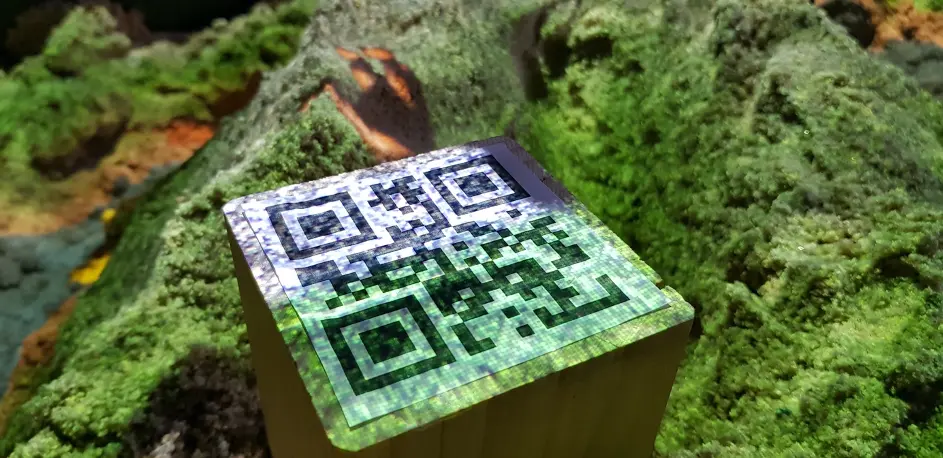
Using OpenCV, the ability to recognize QR codes via the Intel RealSense’s color image stream was integrated. This works by integrating the C# library of OpenCV into a script that, similar to the code example above, accesses a stream that this time should deliver the color image rather than the depth image. The OpenCV library provides a QR code detector class that recognizes the respective QR code on the color image. The recognized event for the QR code is then passed to the main thread via a queue, which then executes the actions associated with the events.
Dynamic Pathfinding:
For pathfinding, Unity as a game engine already provides some building blocks, such as pathfinding and navigation agents (game objects that find their own way to their destination). Due to the constant change of the terrain, it is not enough to generate a static NavMesh like other applications. This must be constantly updated to react to the deformation of the terrain and to provide the navigation agents with an opportunity to find a path through the most current version of the terrain. The navigation mesh can be seen in the figure below. It consists of a traversable area (blue) and a non-traversable (unmarked) area. The traversable area is calculated for each navigation agent based on its parameters such as radius, height, maximum terrain slope, and maximum step height. The video below shows a tiger object that has a navigation agent and moves on the terrain in the sandbox using dynamic pathfinding.
Performance Optimization Using Shaders
Shaders offer the ability to offload the calculation for color, position, etc. of individual polygons (called vertices in Unity) from the CPU to the GPU. Thanks to its ability to perform parallel calculations very efficiently, the GPU offers a good way to significantly increase performance when coloring the terrain.
Unity provides the Shader Graph, a graphical interface for editing otherwise very complex shader code. The shader for coloring the terrain can be viewed in the figure below. Through the position (green area) and textures (blue area) that are passed to the LERP (Linear Interpolation) function as input parameters (red area) and combined through this, an output texture corresponding to the height is generated, which also enables smooth transitions between textures.
Augmented Reality – An Outlook
With the components that this project provides, much more complex augmented reality topics can be represented in the sandbox. Examples include:
- Visual representation of flood areas
- Wind simulation
- Planning and visualization of terrain changes in the sandbox
- Play box for children and school classes to make geography more interesting
Augmented Reality offers high potential as it enables collaborative work on virtual things in the real world and immediately visually represents these changes without having to buy glasses or other technical devices for each user. Unity also provides an excellent foundation for implementing projects in this field.