From JavaScript to Desktop App
 Anton Spöck
2 min read
Anton Spöck
2 min read
Background: The backend of our product idea “croGoDeal” is partially based on the serverless framework and Amazon Web Services (AWS). We use an AWS Lambda function behind the API Gateway that serves as a GraphQL interface. The entire user management is handled with the AWS service Cognito. To test the interfaces at different development stages behind the API Gateway without having to remove authorization, we developed a desktop tool with Electron that generates JSON Web Tokens (JWT) for us.
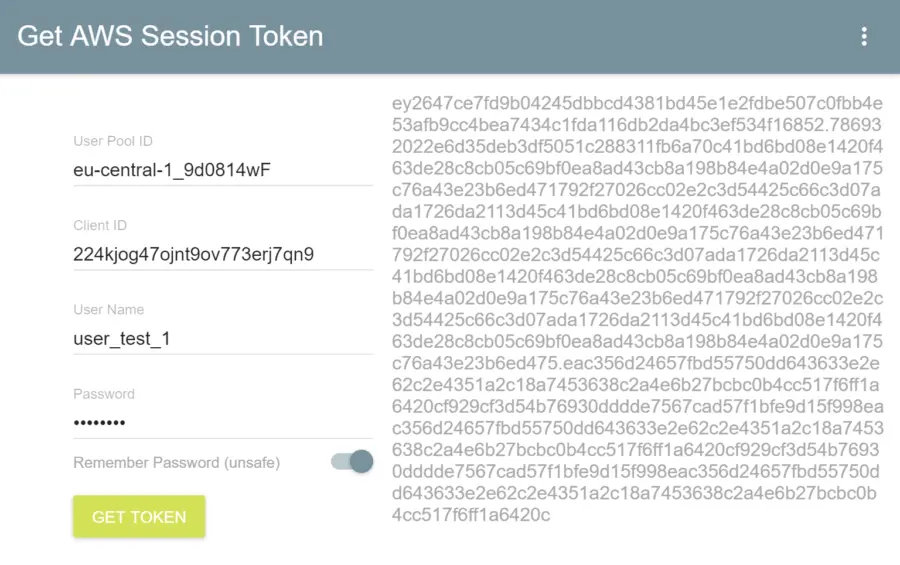
AWS Cognito Token Generator Software
How It Works
The screenshot shows the functions of the application. As input, only the Cognito UserPool, ClientId, and user credentials are needed. The token is displayed on the right after login and can be copied to another development tool. To avoid entering the data at every start, the settings are persistently stored in the application context.
Technologies
The application was completely programmed with the JavaScript library React, which is normally used to develop Single Page Applications. To use a React app on a desktop PC, we use the framework “Electron.”
Electron delivers our React app as a desktop application using Chromium and Node.js.
For connecting to the AWS Cognito service, we use the official aws-sdk for JavaScript.
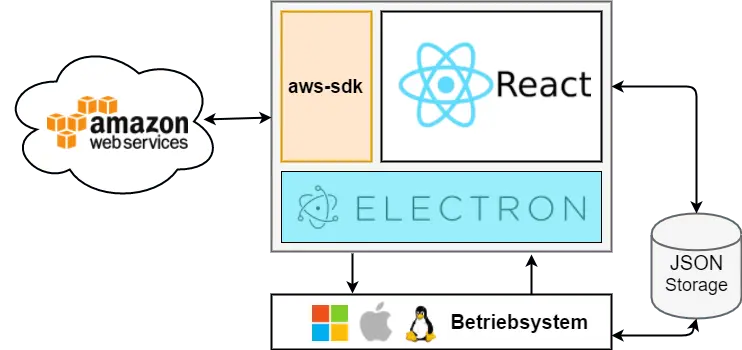
AWS Cognito Token Generator Software Architecture
Data management and state changes in the application are implemented using Redux following the Flux architecture. To persistently store the input data, they are written to JSON storage via key-value pairs. This is always done by the respective Redux reducer before it returns the new state:
// user reducer export default function user(state: any = , action: actionType)
With this approach, one must keep in mind that every state change also triggers a write access to the hard drive. When developing an app with many state changes and potentially large objects, it’s better to use periodic data storage, as the framework redux-persist does.
The project source code is open source and available on our GitHub page.