Akka Service Deployment on Kubernetes
 Tobias Jonas
5 min read
Tobias Jonas
5 min read
Starting Point
There are many excellent tutorials on developing reactive services with Akka, Akka-cluster, or Akka-persistence. However, most of these tutorials focus purely on development and clean code, not on deployment. This blog post addresses exactly this topic. We will package a demo microservice architecture with two services into Docker containers using sbt-native-packager and then deploy them to minikube or Kubernetes (k8s) using akka-management.
The Demo Architecture
Our reactive software system is based on the classic Greeter demo app from akka-grpc. Using an akka-http interface, people can be greeted, and the count of how many times a person has been greeted is provided by an akka-cluster.
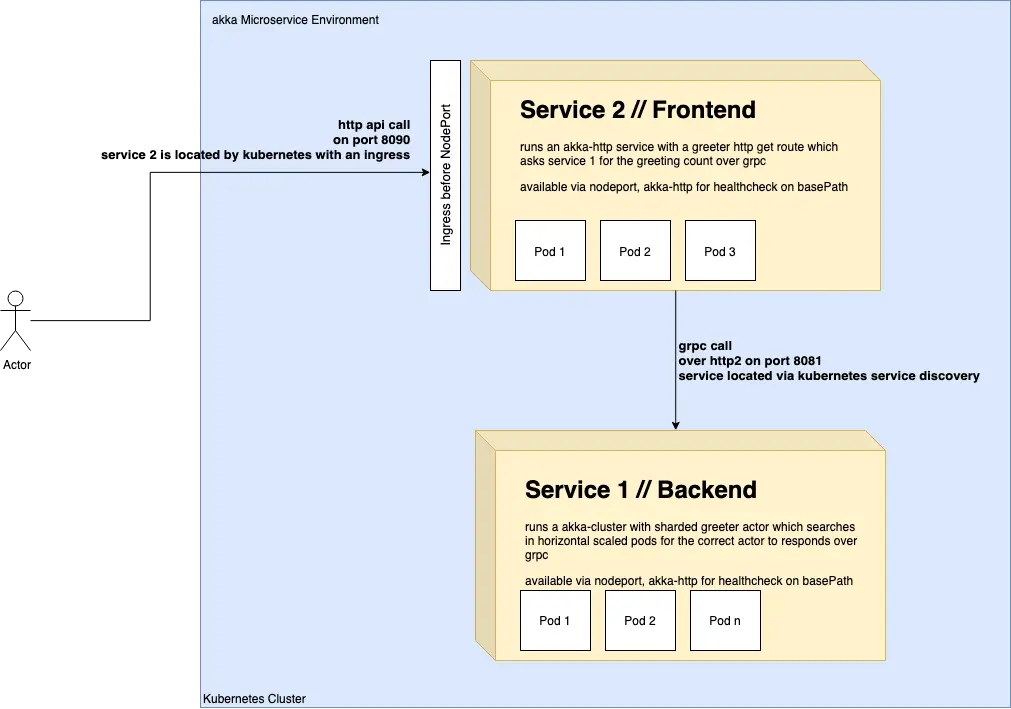
Our demo consists of two services that communicate with each other within the Kubernetes network via gRPC and the akka-grpc module. Service 1 represents an arbitrary backend service that builds and operates an akka-cluster on multiple Kubernetes pods. A deployment with ReplicaSet is used for this. Service 1 uses akka-management and the kubernetes-api extension for cluster creation and service discovery. This builds the cluster and allows new nodes to be added to the akka cluster as needed. Additionally, akka-management provides very useful interfaces for health and readiness checks for the services on port 8558. Service 1 also has a gRPC interface on port 8081 that can be called by Service 2. Service 2 simulates a frontend layer. An example use case for such a service would be if you want to bundle services via GraphQL or the Backend 4 Frontend pattern. Service 2 has a public HTTP API that allows users to have people greeted. The service runs as a NodePort service in Minikube. Since we’re using minikube, we don’t need an ingress. However, an example ingress is also included in this post.
Note:
This demo architecture, unlike many other good tutorials, doesn’t place much emphasis on code quality and has simplified many things. The service discovery for the gRPC endpoint from Service 2 to Service 1 is also created with akka-management and the included akka Service Discovery. However, the demo does not use the created Cluster IP service but communicates directly with the first pod found. For the search, Service 2 uses the selector app=service1 and blocks the thread with Await. For a production environment, the thread should not be blocked; instead, the Future should be handled reactively. The direct query using “.get” should be validated and checked beforehand. The logging is also not particularly cleanly implemented and occasionally contains println statements. Originally, we created this demo for one of our students who is currently writing his bachelor’s thesis on “Advanced logging, monitoring and tracing in akka”. Once he has implemented his work, we will certainly add the results and publish another blog post. The println statements should then be removed.
Preparing the Kubernetes Cluster / Minikube
For our deployment, we use minikube, but these steps can also be largely performed with a “regular” Kubernetes cluster (e.g., via GKE, EKS, AKS). On MAC OS, minikube can be installed with
and started with
Before we can build containers for the Kubernetes registry, we need to configure our environment for minikube.
For service discovery via akka-management to work, we need to add RBAC RoleBindings for our “default” account in the “default” namespace. This script comes from the Lightbend akka-management documentation.
Creating Docker Containers
The GitHub repository contains an sbt multi-project with some useful alias commands in sbt. There is a “runAll” command that starts all services using the sbt-revolver sbt plugin, similar to what you know from Lagom. These services can be stopped again using the “stopAll” command. For automatically building all containers, there is a “buildAll” command. A script for building the containers is located in the k8s folder in the repository. This uses subprocesses to build the containers in parallel.
The Docker configuration for each service is kept very simple. More information on configuration can be found in the sbt-native-packager documentation.
and
Up and Running - The Deployment on Kubernetes
Once the Docker container build is successfully completed, the yaml files from the k8s folder can be deployed using kubectl. Due to the Await in Service 2, Service 1 should definitely be fully deployed first, and you should wait until the akka cluster is fully online and all health checks of the pods are successful. Service 1 can be deployed with
and Service 2 can be deployed with
on Kubernetes.
Since we want to use akka-management for the health and readiness checks in Kubernetes, we need to expose the ports accordingly.
Service 2 can be used directly via minikube. The URL can be obtained with the command
When you open the output URL in a browser, an HTTP-200 with the message “Service 2 is ok” should be returned.
As already mentioned, both services create a Deployment and a Kubernetes Service. Service 1 is a ClusterIP and bundles the pods under an internal IP, and Service 2 is a NodePort that could also be accessed externally through an Ingress.
When all services are online, you should be able to have users greeted via the HTTP interface from the outside. The cluster counts how often the user has been greeted.
The request “http://192.168.99.100:32462/greet/innFactory” should output something like: “Hello innFactory - The actorsystem greeted you 1 times!”
Note:
We deployed Service 1 with a Cluster IP in Kubernetes but don’t use it. For a production scenario, we should use this Cluster IP as the gRPC endpoint. Additionally, in the Google or AWS Cloud, for example, we need an Ingress to access our service via https with a valid certificate. The following code creates an appropriate LoadBalancer in the respective cloud.
Links
reactive microservice example @ github
Follow-up blog post on monitoring and tracing of Akka applications on Kubernetes.