Our New Website: From WordPress to Hugo in 2 Days with AI
 Tobias Jonas
8 min read
Tobias Jonas
8 min read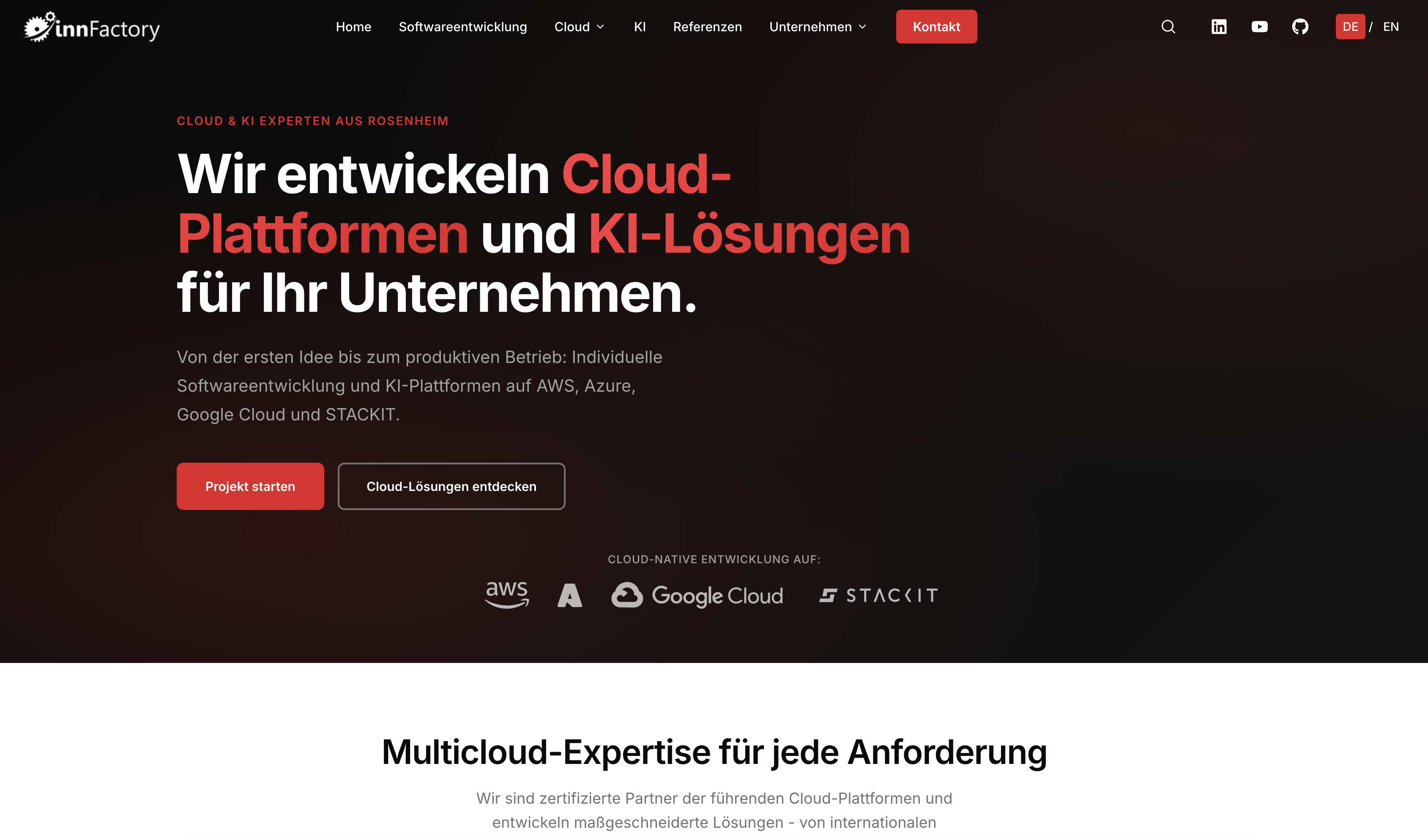
What started as an experiment became a production relaunch
On January 16, 2026, we started an experiment: Can Claude 4.5 Opus replace our outdated WordPress website with a modern Hugo Static Site Generator? Two days later, on January 18, the new site went live. Here’s what we learned.
The starting point: WordPress at its limits
Our old WordPress website worked. But:
- Performance: Load times of 4-5 seconds
- Maintenance: CMS updates, plugin conflicts, security patches
- SEO: Suboptimal Core Web Vitals
- Multilingual: Manual translations with high maintenance effort
We had a relaunch on our list for a long time. But as always: daily business took priority.
The turning point: Claude 4.5 Opus and OpenCode
Then came Claude 4.5 Opus with extended coding capabilities. We wanted to test how well the AI agent could build a complete website.
The setup:
- Base: Hugo Extended Static Site Generator
- Theme: Blowfish (specialized for corporate sites)
- AI Tool: Claude 4.5 Opus with OpenCode
- Budget: Claude ran through our GitHub Copilot Business subscription
- Timeline: Jan 16 kick-off → Jan 18 go-live
What Claude with OpenCode handled
OpenCode worked in sparring with Tobias, handling both planning and implementation:
- Migrated all content from WordPress to Hugo Markdown
- SEO redirects: Automatic search for old URLs in Google + redirect setup
- Multilingual: Translation of all content DE ↔ EN
- Image optimization: Conversion and compression
- Template customizations: Custom layouts for references, jobs, blog
- Deployment: Kubernetes config for GKE with Google CDN
What we did
- Product Owner: Tobias described and prioritized requirements
- Sparring partner: Iterative feedback and design decisions
- Infrastructure decisions: GKE instead of Strato, CDN setup
- Process design: GitHub Actions workflows, issue templates
Reality: While Claude wrote the code, we intensively supervised the process. Still, the effort was significantly less than a traditional rewrite.
The results: Convincing numbers
Performance explosion
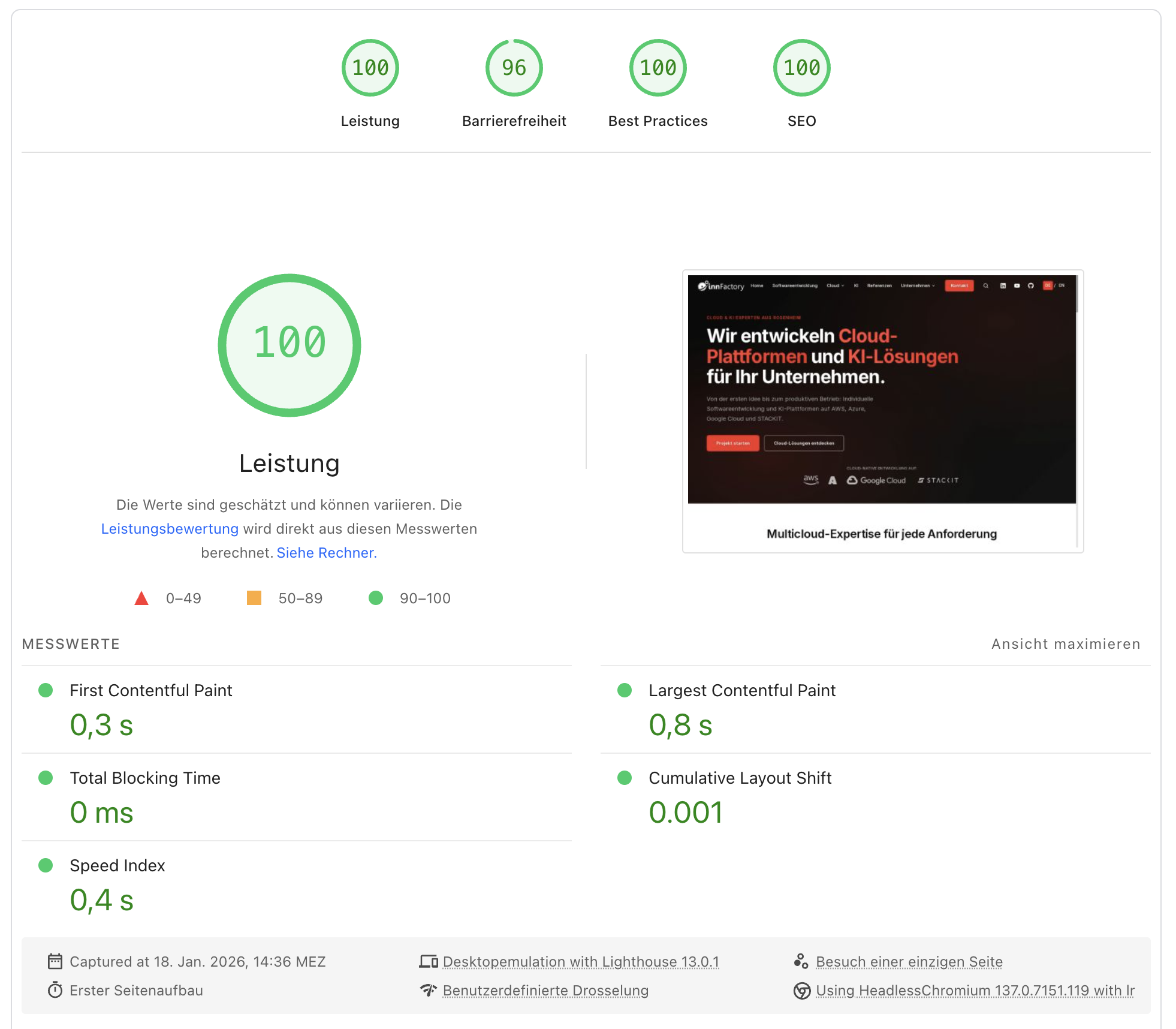
Real metrics from Google PageSpeed Insights (January 18, 2026):
| Metric | Value |
|---|---|
| First Contentful Paint | 0.3 s |
| Largest Contentful Paint | 0.8 s |
| Total Blocking Time | 0 ms |
| Cumulative Layout Shift | 0.001 |
| Speed Index | 0.4 s |
Before vs. After:
| Metric | WordPress | Hugo + CDN | Improvement |
|---|---|---|---|
| Lighthouse Performance | 65 | 100 | +54% |
| First Contentful Paint | 4.5s | 0.3s | -93% |
| Time to Interactive | 5.0s | 0.4s | -92% |
| SEO Score | 92 | 100 | +9% |
| Best Practices | 87 | 100 | +15% |
The real value: Simple management
The performance numbers are impressive, but the actual gain lies elsewhere:
No more plugin chaos
WordPress lives on plugins. And dies from them. After every update, the anxious question: Does everything still work? With Hugo, there are no plugins that suddenly become incompatible. All code is in the repository, versioned and traceable.
Automatic translations
New content is automatically created in DE and EN. GitHub Copilot translates directly when creating the pull request. No more manual translations, no forgotten language versions.
Clear process via GitHub Issues
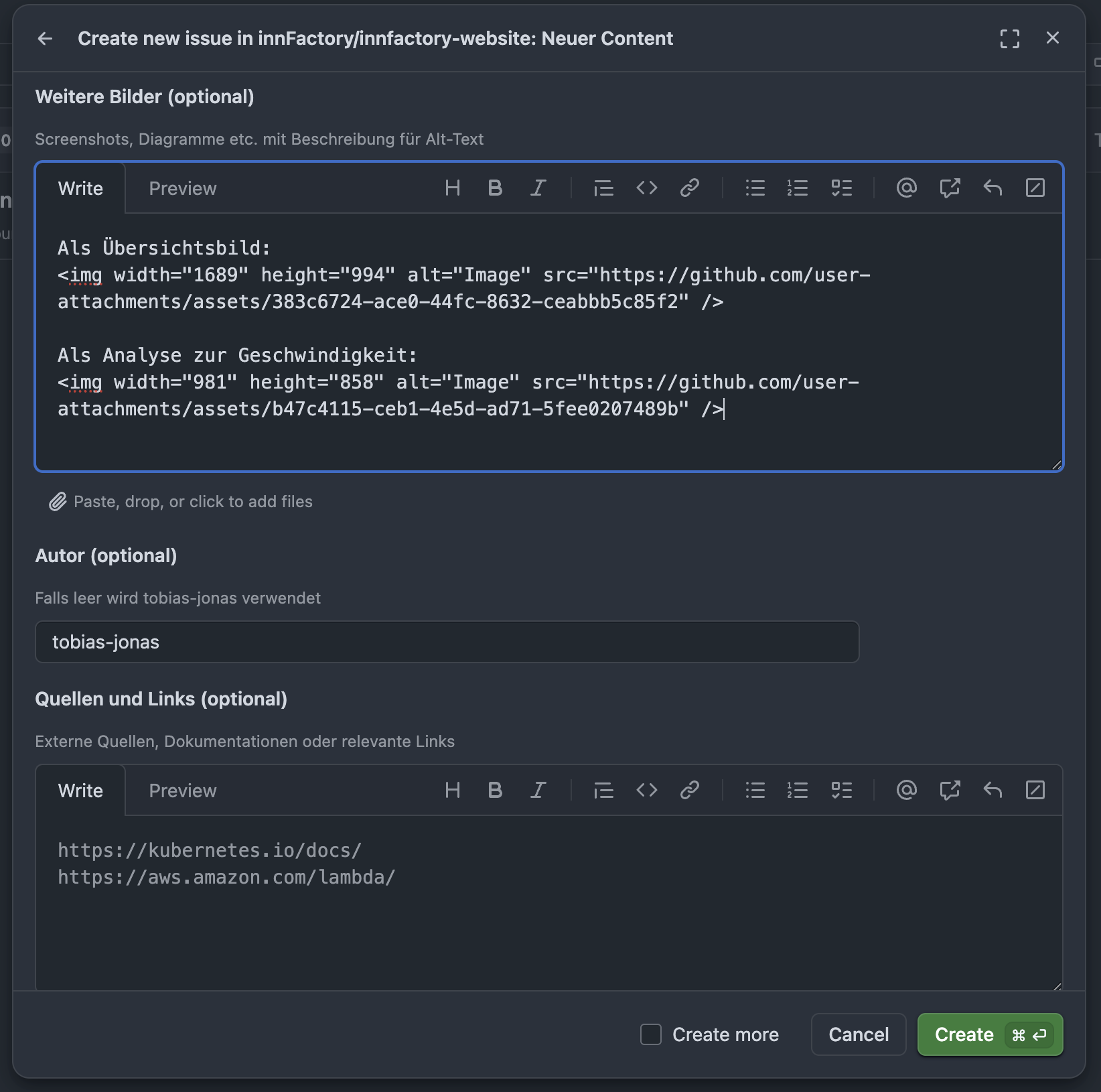
Content creation now follows a defined workflow:
- Create issue with template (blog, job, reference)
- Copilot generates Markdown + translation
- Review in pull request
- Merge → automatic deployment
Everyone on the team understands the process. No training for a CMS backend needed.
Patches without risk
Changes go through pull requests. Staging preview before go-live. Rollback via Git revert in seconds. With WordPress, every update was a risk.
SEO: No rankings lost
Claude searched for all old WordPress URLs in Google and automatically created redirects. Two mechanisms are used:
1. Hugo aliases for individual articles
Old WordPress URLs are defined directly in the article’s frontmatter:
# content/blog/119-chatgpt-cloud-kosten.md
---
title: "ChatGPT: The Cloud Costs of the Most Famous AI Language Model"
aliases:
  - /artificial-intelligence/was-kostet-der-cloudbetrieb-von-chatgpt/
---
The article /artificial-intelligence/was-kostet-der-cloudbetrieb-von-chatgpt/ still has an extremely good Google ranking, even though the URL now internally points to /de/blog/119-....
2. Nginx redirects for structural changes
For categories, language prefixes, and general URL patterns, we use nginx:
# Example from nginx-live.conf
location ~ ^/category/news/?$ { return 301 /de/blog/; }
location ~ ^/author/(.*)$ { return 301 /de/authors/$1; }
location = /karriere/ { return 301 /de/karriere/; }
The result: No drop in rankings, all backlinks continue working.
The new architecture: Static Site + Go API
Frontend: Hugo Static Site Generator
# Hugo Build in GitHub Actions
- name: Build Hugo
  run: hugo --minify --environment production

- name: Deploy to GKE
  run: |
    kubectl apply -f k8s/deployment.yml
    kubectl rollout status deployment/innfactory-web
Advantages:
- No database, no PHP
- HTML generated at build time
- Extremely fast, extremely secure
- Version control via Git
Backend: Go API for dynamic content
For the contact form and analytics, we developed a lean Go API. The contact form validates ReCAPTCHA and forwards requests to Slack.
Analytics without cookies:
Instead of embedding Google Analytics JS directly, everything runs through our API. The frontend sends events to our own API, which aggregates the data and sends it anonymized to Google Analytics.
Advantage: No cookie banner needed, GDPR compliant.
Content management without CMS: GitHub Issues + Copilot
We now create new content via GitHub Issue Templates:
- Create issue with template (blog, case study, job)
- GitHub Copilot handles:
- Create Markdown files (DE + EN)
- Process images
- Set internal links
- Generate SEO-optimized metadata
- GitHub Action automatically deploys to staging
- Review and merge → Automatic production deploy
Example issue for this blog post:
### Content type
Blog post

### Content
- Replaced WordPress
- Claude rebuilt the website in 2 days
- Performance and SEO better than ever
...

### Author
tobias-jonas
Copilot generates:
content/blog/133-ki-website-rebuild.md(DE)content-en/blog/133-ki-website-rebuild.md(EN)- Matching images and metadata
Migration from Strato to Google Cloud
From Strato vServer to GKE:
Why GKE?
- Reserved instances already available
- High availability across multiple zones
- Google CDN with edge caching worldwide
- Native integration with Cloud Build, Cloud Storage
How the setup works
The architecture consists of three layers: Ingress (Load Balancer), Service, and Deployment.
1. Ingress with Global Load Balancer
The GKE Ingress automatically creates a Google Cloud HTTP(S) Load Balancer with a static IP:
# k8s/overlays/live/ingress.yml (simplified)
apiVersion: networking.k8s.io/v1
kind: Ingress
metadata:
  name: innfactory-live
  annotations:
    # Static IP for DNS
    kubernetes.io/ingress.global-static-ip-name: wwwinnfactory-ip-live
    # Managed SSL certificates
    networking.gke.io/managed-certificates: innfactory-live-cert
    # HTTPS redirect
    networking.gke.io/v1beta1.FrontendConfig: innfactory-https-redirect
spec:
  rules:
    - host: innfactory.de
      http:
        paths:
          - path: /api/*
            backend:
              service:
                name: innfactory-web-api
          - path: /*
            backend:
              service:
                name: innfactory-website
2. Service with BackendConfig for CDN
The Service connects the Load Balancer with the pods and enables Cloud CDN:
# k8s/base/service.yml
apiVersion: v1
kind: Service
metadata:
  name: innfactory-website
  annotations:
    # BackendConfig for CDN and health checks
    cloud.google.com/backend-config: '{"default": "innfactory-website-backendconfig"}'
    # Network Endpoint Groups for better performance
    cloud.google.com/neg: '{"ingress": true}'
spec:
  type: ClusterIP
  selector:
    app: innfactory-website
  ports:
    - port: 80
3. BackendConfig with CDN caching
# k8s/overlays/live/backendconfig-patch.yml
apiVersion: cloud.google.com/v1
kind: BackendConfig
metadata:
  name: innfactory-website-backendconfig
spec:
  cdn:
    enabled: true
    cachePolicy:
      includeHost: true
      includeProtocol: true
      includeQueryString: false
  healthCheck:
    type: HTTP
    requestPath: /health
How Google CDN works with the Load Balancer
The traffic flow looks like this:
- User request → Google Edge Location (150+ locations worldwide)
- Cache hit? → CDN serves directly (< 50ms)
- Cache miss? → Request goes to Load Balancer
- Load Balancer → distributes to Nginx pods in GKE
- Response → gets cached in CDN for subsequent requests
The CDN caches based on Cache-Control headers from nginx. Static assets (CSS, JS, images) are cached for up to one year, HTML only for 60 seconds. After each deployment, we invalidate the CDN cache via GitHub Action.
Lessons learned: What worked?
What went well
1. Claude 4.5 Opus with OpenCode as code generator
- Extremely fast for repetitive tasks (Markdown migration)
- Good quality with clearly defined requirements
- Saves developer time for standard patterns
2. Hugo as foundation
- Perfect for corporate sites
- Large theme ecosystem
- Build times < 5 seconds
3. GitHub-based workflow
- Content in Git = full version control
- Issues as CMS replacement works
- Developers and marketing work in the same tool
What was challenging
1. AI needs precise specifications
- Vague requirements → unsatisfying results
- Iterative feedback was essential
- Some decisions require human expertise
2. Styling and complex designs
- Initial styling is not easy with AI
- Complex designs are still difficult to implement
- Lots of trial-and-error with CSS adjustments
3. Vibe coding needs guardrails
- Good content was sometimes removed during the process
- Guardrailing for content is extremely important
- Clear instructions on what must not be changed
4. Migration is never trivial
- WordPress content had inconsistent formats
- Images needed manual post-processing
- Old shortcodes → Hugo shortcodes
Conclusion: MVP approach for websites too
The site isn’t 100% perfect yet. But as usual in software development: we start with an MVP. It far outperforms our old site, and some texts will be improved in the coming weeks.
What we learned:
- AI massively shortens development time: but only with good guidance
- Product ownership remains human: Claude needs clear instructions
- Static sites are underestimated: not every website needs a CMS
- Git > CMS for tech-savvy teams: full control, no vendor lock-in
- The process matters more than the tool: GitHub Issues + Templates create clarity
Time will tell how this works long-term. It will also be interesting to see how dynamic content evolves. For us, the old monolithic CMS model is outdated since we don’t have requirements like e-commerce.
For such use cases, the future will be exciting. Although complex e-commerce solutions today are already essentially software projects and have nothing to do with traditional web design. More complex UIs and interactive content are harder with static site rendering, but not impossible: AI can manage the complexity well.
Outlook: What’s next?
We’re now collecting experience with innfactory.de over the next few weeks. After that, we’ll do the same for innfactory.ai.
Planned:
- Automatic blog post generation from issue bullet points
- AI-assisted translations with quality assurance
- Automatic image optimization and alt text generation
- SEO monitoring with automatic improvement suggestions
The vision: Content idea → Issue → AI generates article → Review → Live
In 12 months, we’ll look back and evaluate whether it worked.
We accompany you on your GitOps journey
As a cloud partner, we help companies adopt GitHub and accompany them on their GitOps and DevOps journey. From initial strategy to production implementation.
Cloud reselling from one source: Google Cloud, Azure, AWS, STACKIT, and GitHub can be obtained centrally from us. One invoice, one contact person, bundled expertise.
Want to learn more about GitOps, GitHub, or AI? Talk to us or innFactory AI Consulting. We’re happy to share our experiences.
Contact us for a no-obligation conversation.